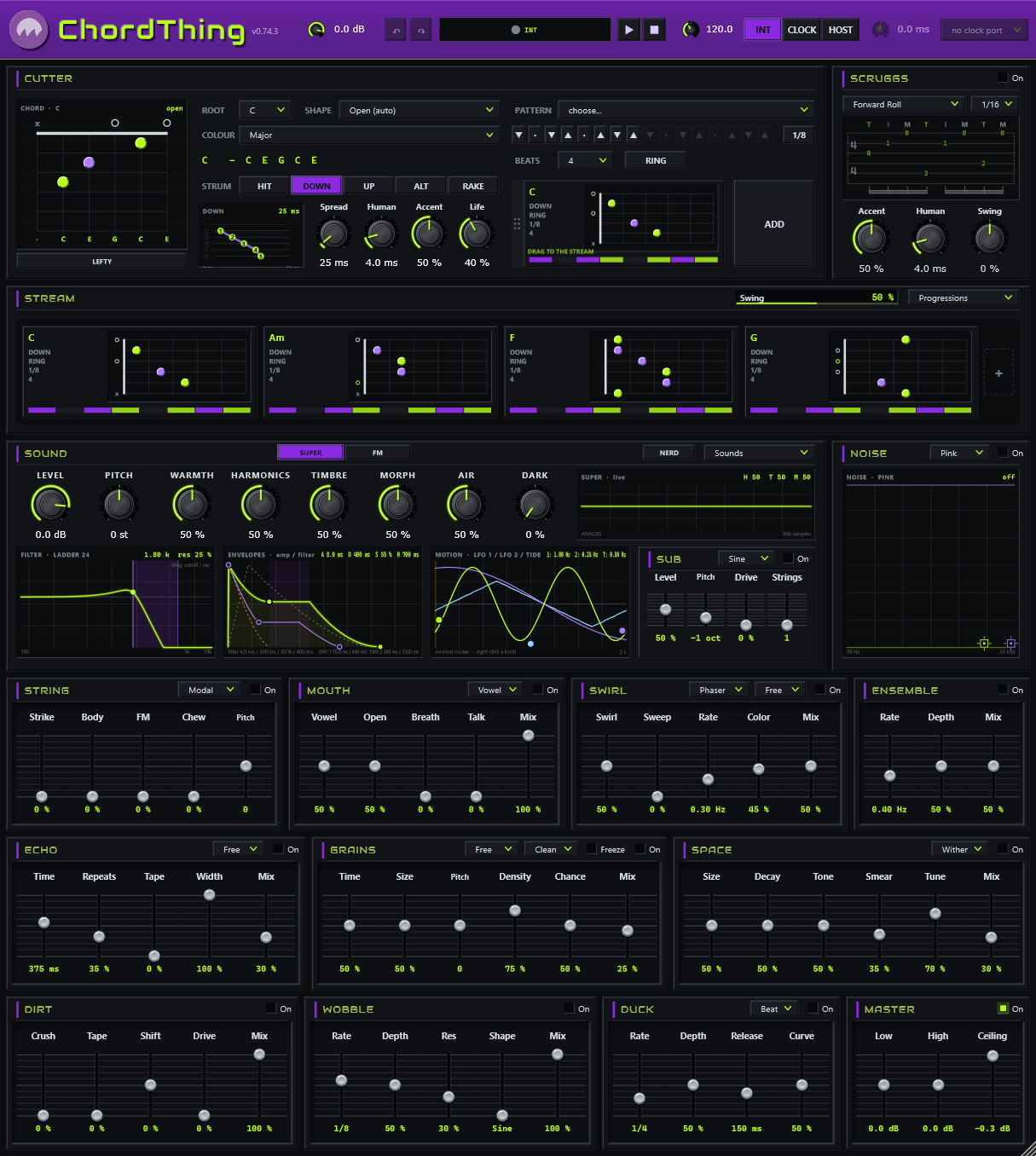
a chord synth for the guitar-brained
Pick a chord on a fretboard. Give it a strum, a rake, or a finger roll. Build a progression in the stream and watch it flow: a band to play over, write over, or lean on. Bring your own synth with ChordThing MIDI.
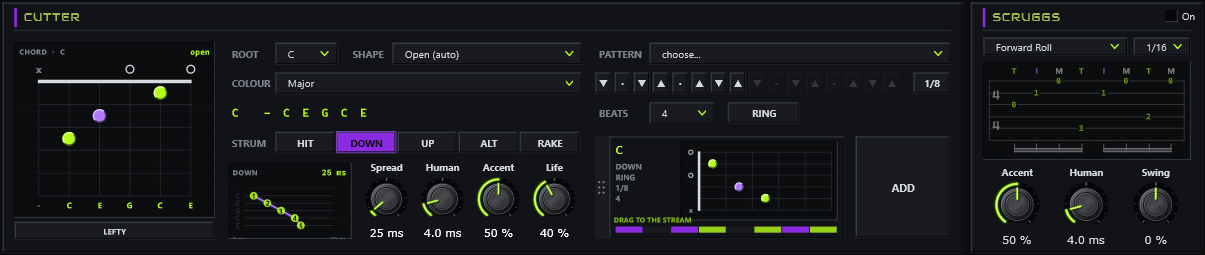
Cutter. One chord, drawn on six strings the way you’d finger it. Pick a root and a colour (major, minor, sevenths, suspended, power chords and more) and a shape: the five forms up the neck, or open. Click a fret to voice it by hand; right-click a string to mute it, open it, or read the chord from its note. Strum it with HIT, DOWN, UP, ALT or RAKE, with Spread, Human, Accent and per-string Life; write the rhythm in the pattern cells, then let it ring into the next chord or choke. LEFTY flips every diagram.
SCRUGGS. Banjo-style finger rolls on any chord. A roll is written in roles (the thumb’s bass and alternate bass, then the G, B and high E strings), so one roll fits every chord. The screen shows it as tab on the chord that’s playing; click a step to change it and save your own. 1/8, 1/16 or triplets, in 4/4, 3/4 or 6/8. Switch it off and your stream is exactly as it was.

The stream is the song: chord plates side by side, each as wide as it lasts. Drag chords in and press play. Select several and edit them together, group a run and duplicate it, transpose one chord or a whole selection, or load a progression by mood. A chord change lets go of the chord before it, so nothing rings past its chord. Swing pushes the off-beats.
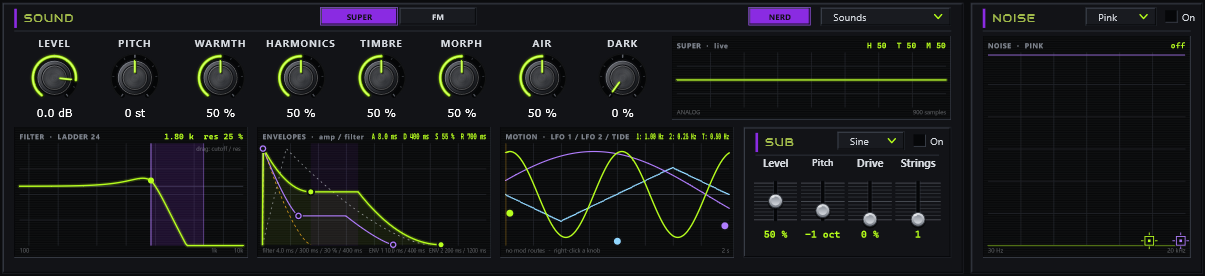
Two engines. SUPER is a model-based voice (analog shapes, strings, bars, plucks, particles and more) with a second oscillator; FM is a six-operator voice that loads .syx banks and plays them as they were voiced. Five macro knobs follow the engine and the model, and DARK eases the highs into tape. Every screen is live: drag the filter, the envelopes and the motion. SUB puts a sine, triangle or square under the lowest strings; NOISE adds breath, a pick’s scrape, dust or crackle, shaped by two nodes on its screen.
The Sounds menu holds twenty-five sounds in seven groups: PADS, KEYS, PLUCKS, SYNTH, BEDS, TRIPPY and MULTI (a different voice on each pair of strings). Each one is built on a different kind of synthesis and uses at least three of the devices.
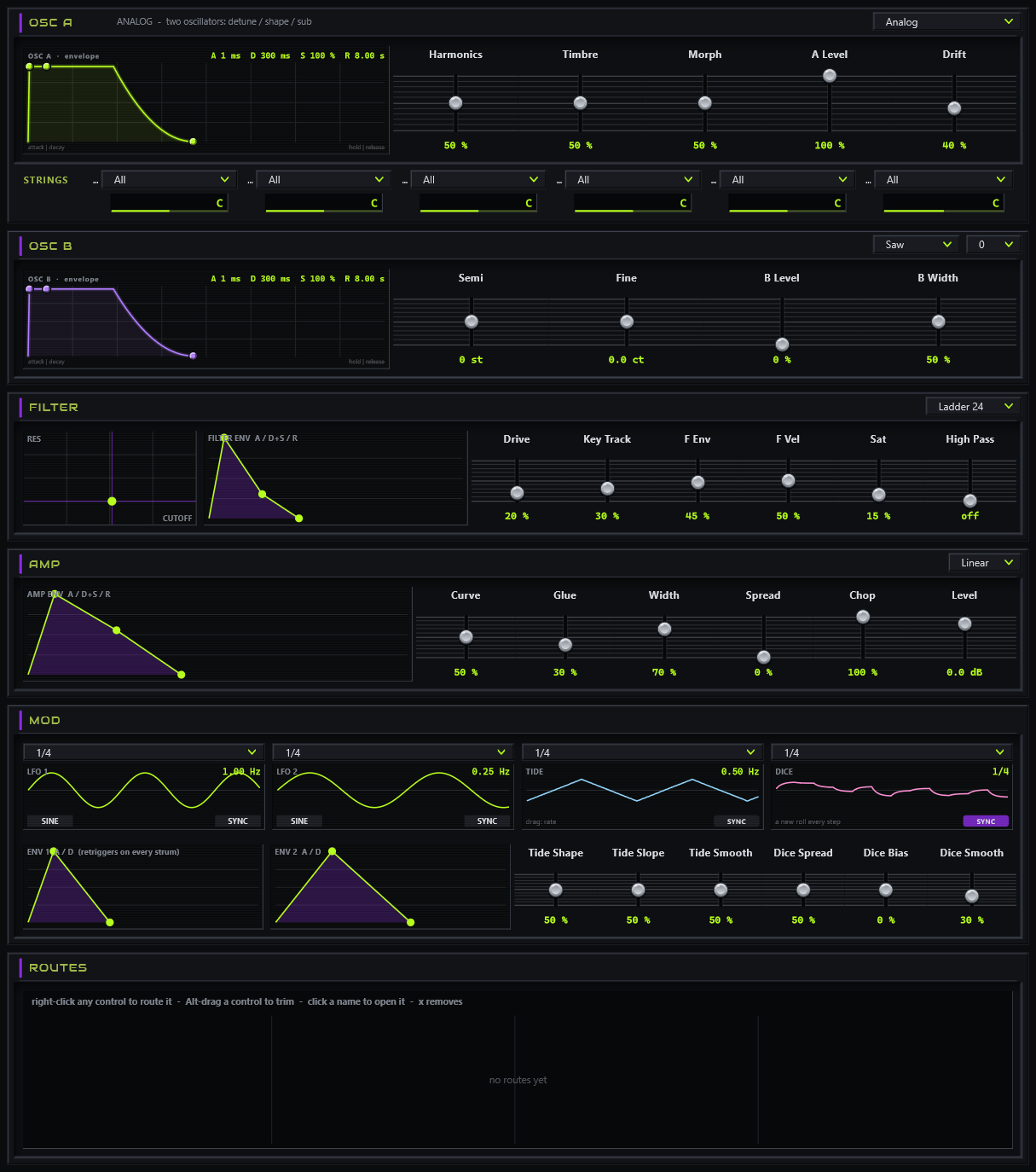
The NERD button opens every control of the voice in one window: both oscillators with their own envelopes, the filter, the amp, the modulators and the routes.
A model per string. Each string can take its own model, a bar on the low strings and a pluck on the high ones, each with its own oscillator, drawn in its own colour, and a pan slider that moves it across the stereo field.
Modulation everywhere. Right-click any knob or slider to route a source to it: two LFOs, two envelopes, the tide, dice, the oscillators’ own envelopes, or how hard you strummed. LFOs, tide and dice sync to divisions up to eight bars. The ROUTES list shows every route at once.
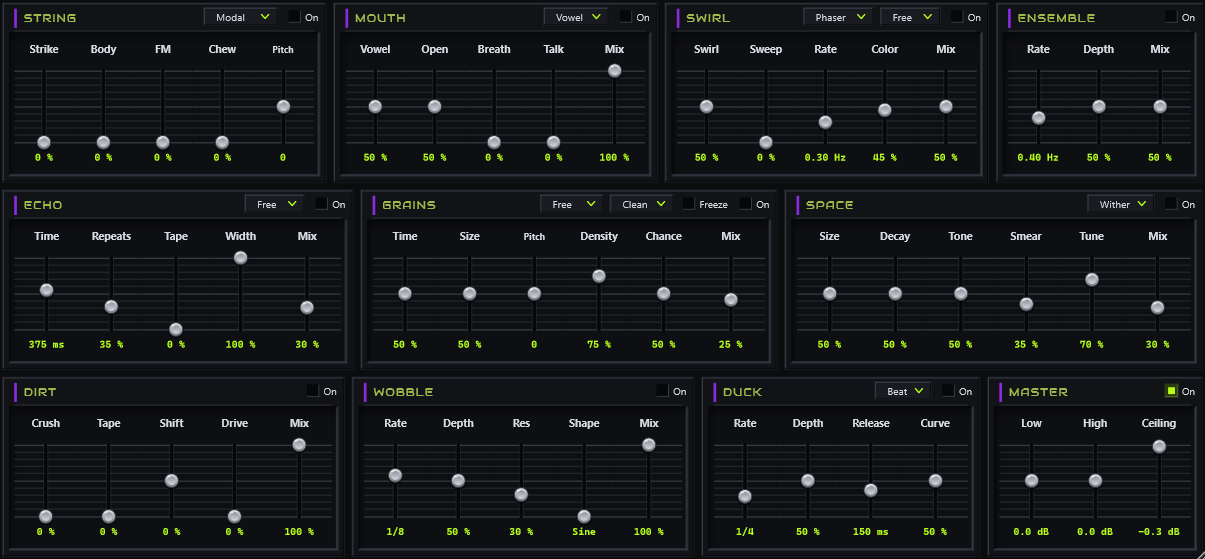
Every string gets its own body, strike, FM and chew (STRING). The rest run on the mix: MOUTH, a vowel filter that talks; SWIRL, an ensemble with a phaser or flanger sweep; ENSEMBLE, the chorus on its own; ECHO, one delay whose free time bends like tape, or snaps to the beat; GRAINS, a granular processor fed freely, on every strum, or on the clock; SPACE, one ambient tank with two faces, Wither and Flower; DIRT, crush, tape, shift and drive; WOBBLE, a resonant low-pass swept on the beat; DUCK, the pump on the beat or on every hit; and MASTER, shelves and a ceiling, always last.
Every device is a card of vertical sliders with its options in a drop-down, and each one is off until you want it, MASTER aside.
Three clocks. ChordThing is its own clock (INT), follows your DAW’s tempo and transport (HOST), or locks to a MIDI clock on a port you pick (CLOCK), so it can play along with a drum machine. The status shows when it’s locked and counts any clock ticks it had to recover, and the ms knob lines the stream up by ear.
The header. MASTER sets the whole output and stays put as you change sounds. Undo and redo cover every control, chord and route. Six colour schemes (one colour-blind safe), MIDI learn on any control, and your sounds, progressions, patterns and rolls saved as small files you can share.
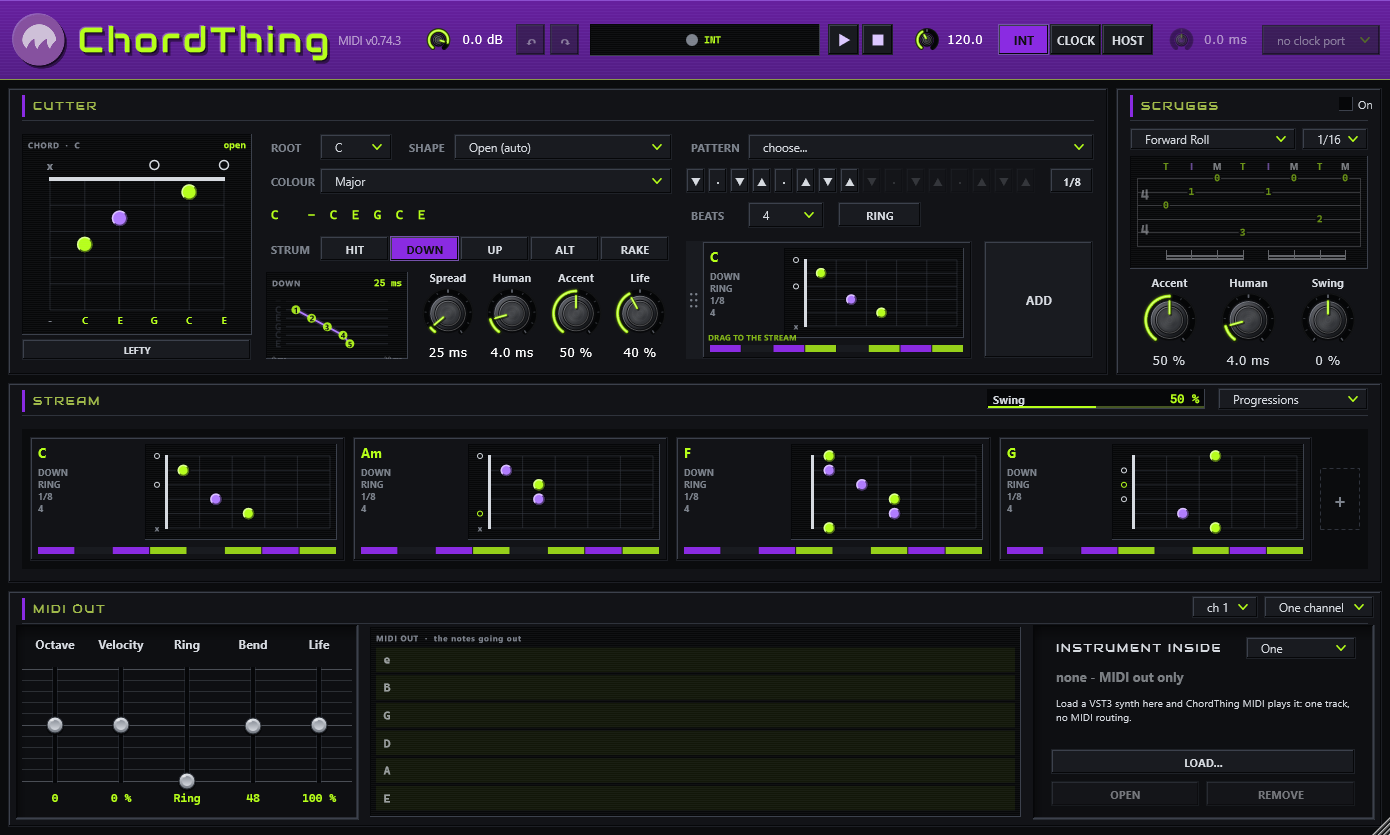
Some people want ChordThing for its hands, not its sound. ChordThing MIDI is the cutter, the patterns, the rolls and the stream, playing any instrument instead: your favourite synth, a piano library, a hardware synth through the standalone.
Instrument inside: load a VST3 synth into ChordThing MIDI and it plays it on its own track, no routing. Or send the notes out to another track, on one channel, a channel per string, or MPE.
ChordThing and ChordThing MIDI are in final testing. Drop your email and we’ll ping you the moment they’re out, launch price and all. That’s the only thing this list is for.
No spam, no list-selling. One heads-up when it’s live.
$30. Or type CHORDLAUNCH at checkout while the promo lasts and it’s $10. ChordThing and ChordThing MIDI, one license, offline, yours forever, and updates are free, always. Not right for you? Refund within 14 days.
CheckoutStripe · card · instant license30 days, both of them, the whole thing, no card. One trial per email, ever.
Start the trialinstant license fileEverything else: the ChordThing manual.