NoAMP
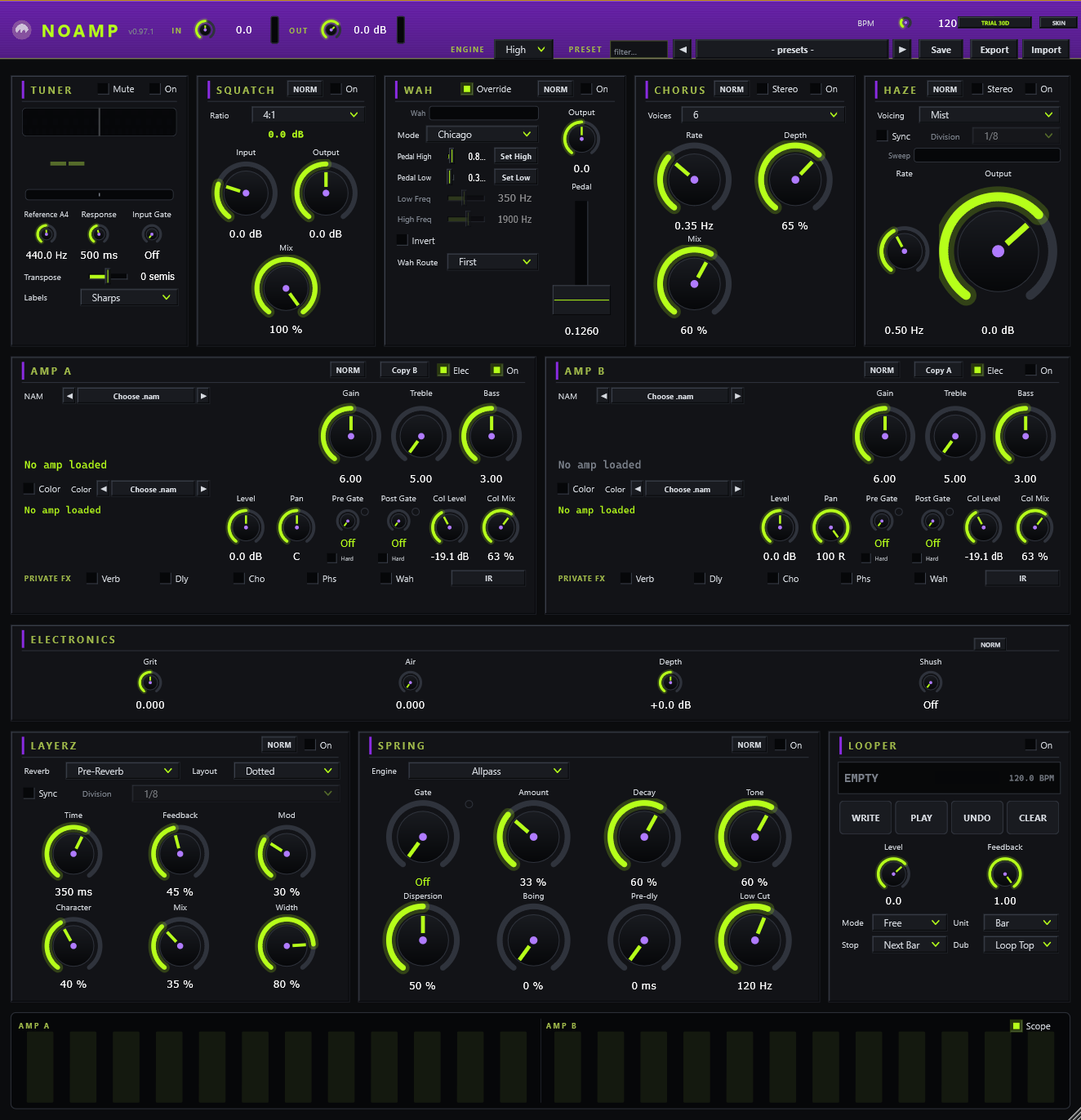
Your whole rig in one window — everything but the amp. NoAMP plays .nam files — amp captures made with Neural Amp Modeler — inside a full board: tuner, compressor, a wah with no heel/toe click, chorus, phaser, tempo-synced delay, spring reverb with an infinite freeze, and a looper that works like a guitar looper with your real MIDI hardware. No chains of gateway plugins. Computer software, on purpose.
You bring the amps and the dirt: two capture slots for amps, a Color slot in front of each for drive/fuzz captures, cab IRs, and folder-stepping ◀ ▶ arrows to audition whole packs hands-free. Easy steps below.
› YOUR .NAM A ‖ YOUR .NAM B › ELECTRONICS
› LAYERZ › SPRING › LOOPER › OUT
- Every pedal ships as its own VST3 too — eight modules in the box, each with its own manual page.
- MIDI learn on everything — right-click any control, bind a CC. Preset steppers + looper included.
- Peak-safe auto-leveling — every capture lands at the same loudness, no clipping roulette (Raw switch for purists).
- Offline license file — no account in the plugin, no phoning home, ever.
- Signed binaries · Windows 64-bit · VST3 + standalone .exe (no DAW needed).
Buy it
$20 — launch promo code LAUNCH takes it to $5 at checkout. One license, yours forever, offline.
Try it free
30 days, the whole thing, no card. One trial per email — ever.
The download is the full thing — the license file unlocks it. No license yet? It still runs 10 minutes of full audio per session so you can hear it before anything.
In the zip: NoAMP.exe (standalone), NoAMP.vst3, a Modules\ folder with all eight pedals as separate VST3s, and the full manual set (the same pages linked below, offline).
1 · Install. Copy NoAMP.vst3 into C:\Program Files\Common Files\VST3, put NoAMP.exe anywhere. Rescan in your DAW, or just double-click the exe.
2 · Get amps. Grab free .nam captures from tone3000.com (huge library — filter by amp type and gain) or tonehunt.org. Captures are made with Neural Amp Modeler, Steven Atkinson’s open-source project. Make a folder like Documents\NAMs.
3 · Load an amp. Click Choose .nam on amp A, pick a capture. The ◀ ▶ arrows step the whole folder — audition a pack hands-free.
4 · Load dirt. Each amp’s Color slot takes a drive/fuzz/boost capture IN FRONT of the amp — tone3000 has pedal categories too. Capture into capture, exactly like a pedal into an amp.
5 · License. Click the amber LICENSE banner → Load license file → done, forever, offline.
Full walkthrough with the cab-IR step: the NoAMP manual.
No fat info dump — every device gets its own page with controls, steps and technical specs. The same pages ship inside the zip.
NoAMP — the board · header, tempo, NORM/NERD, leveling, private FX, license
Toonz — tuner · spring needle, motion detection, magnetic zero, drop tunings
Wines — wah · nonlinear ZDF sweep + the Set Low / Set High pedal calibration
Squatch — compressor · FET-style squeeze, 4:1 to All, parallel mix
Shimmer — chorus · 2–6 detuned voices, dispersive top, mid/side spread
Haze — phaser · voiced allpass cascade with a chaos engine
Layerz — delay · note-value sync, layouts, mod, bit-crush trails, freeze
Springs — reverb · spring / FDN / IR engines + tempo-synced Freeze windows
Loopz — looper · the 4-switch cycle, quantized punch-out, multiply
Your USB MIDI stomp goes silent until you replug it? That’s Windows putting USB to sleep, not your gear — turn off USB selective suspend (two minutes, step-by-step).
Ableton Live won’t MIDI-learn? Live doesn’t hand MIDI to effect plugins. Click Configure on the device panel, drag the knob you want in the plugin window, then map that panel knob with Live’s own Ctrl+M — full steps + where MIDI learn does and doesn’t work.
MIDI wah feels wrong at the ends? Calibrate it: heel down → SET LOW, toe down → SET HIGH — the can’t-miss walkthrough.